The n8n vs Power Automate decision is really about which ecosystem you already live in. If your company runs on Microsoft 365 and your builders are non-technical, Power Automate is often the right default. If you need self-hosting, data sovereignty, or control over your AI stack, n8n is the stronger pick. This comparison uses official prices as listed on Microsoft and n8n pages, checked September 4, 2026, so the licensing numbers are checkable rather than recycled.
Key Takeaways
- Power Automate Premium lists at approx. $23 AUD ($15.00 USD) per user/month (paid yearly), but Microsoft 365 licenses include only standard connectors — once a flow touches a premium connector, someone needs a paid license.
- Power Automate’s Process license (approx. $230 AUD / $150.00 USD per bot/month) covers a business process or up to 25 solution-aware cloud flows in a “flow group,” and replaced the retired per-flow plan.
- n8n Community Edition is $0 AUD to self-host under the Sustainable Use License; n8n Cloud starts at approx. $33 AUD/mo (€20/mo) for 2,500 executions. Self-hosting still costs server and maintenance time.
- Desktop robotic process automation (RPA) — automating apps with no API — is the one workload n8n does not natively provide, so desktop RPA typically stays on Power Automate or moves to a dedicated RPA tool.
- Neither platform wins outright: M365-centric shops should start with Power Automate; platform-independent, data-sovereign, or AI-agent builds lean n8n.
Quick Answer: n8n vs Power Automate at a Glance
Power Automate is the default if your company already pays for Microsoft 365 and lives in Teams, SharePoint, and Outlook; n8n wins if you want to self-host, control costs at volume, or build AI agents with your choice of model. Neither is universally “better.”
| Your situation | Better fit |
|---|---|
| Already on Microsoft 365; non-technical builders; Teams/SharePoint flows | Power Automate |
| Desktop RPA on legacy apps (no API) | Power Automate (n8n does not natively provide desktop RPA) |
| Data sovereignty / self-hosting required | n8n |
| AI agents with a chosen model (OpenAI, Anthropic, local) | n8n |
| Cost control at high volume | n8n self-hosted |
| Deep native SharePoint/Teams/Outlook integration | Power Automate |
| Heavy governance (DLP policies, admin center) | Power Automate |
The sections below walk the trade-offs behind that table — especially where Power Automate’s real cost hides and what self-hosted n8n actually costs in time.
What Is the Actual Difference Between n8n and Power Automate?
Power Automate is Microsoft’s low-code automation layer for its own ecosystem; n8n is a source-available, developer-friendly platform that runs anywhere.
Power Automate’s service and control plane are cloud-hosted and tenant-bound, governed through the Power Platform admin center; desktop flows run on machines you designate, but they still depend on the Power Automate cloud service. Its two automation styles matter: cloud flows run on Microsoft’s infrastructure using connectors and APIs, and desktop flows deliver robotic process automation (RPA) — software that mimics clicks and keystrokes in apps that have no API, the way a human would. Digital process automation (DPA) is the API-driven alternative: cloud flows that move data between services.
n8n is source-available under its Sustainable Use License rather than open source, and you can run it in the cloud or on your own infrastructure. Workflows are portable JSON, and nodes can run JavaScript (Node.js) natively and Python via task runners or Pyodide — the more natural home for developers. n8n provides dedicated SharePoint, Teams, and Outlook nodes; generic Microsoft Graph access is also possible through the HTTP Request node.
How Does the Pricing Compare — and Where Do the Surprise Costs Hide?
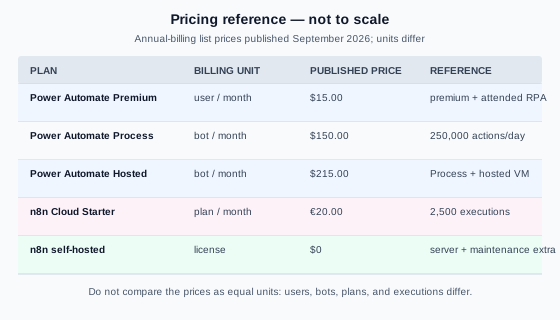
Power Automate bills per user, per bot, or per process; n8n Cloud bills per execution; self-hosted n8n bills nothing per run at all. The sticker price is not where Power Automate gets expensive — the licensing layers are. Microsoft’s official monthly list prices, paid yearly, are Power Automate Premium at approx. $23 AUD ($15.00 USD) user/month, Power Automate Process at approx. $230 AUD ($150.00 USD) bot/month, and Power Automate Hosted Process at approx. $330 AUD ($215.00 USD) bot/month, which Microsoft describes as Process “with a virtual machine managed by Microsoft and hosted on Azure infrastructure” (Power Automate pricing). A Process Mining add-on lists at approx. $7,700 AUD ($5,000.00 USD) tenant/month. The page notes its prices are “for marketing purposes only.”
Now the layer most comparisons miss. If you already pay for Microsoft 365, what you get is limited: “users with the free plan or one of the Microsoft 365 license plans can only access standard connectors” (Power Automate licensing FAQ). Standard connectors cover SharePoint, Teams, and Outlook; a flow that needs Salesforce, ServiceNow, or Dataverse is outside the included tier.
n8n’s side is simpler. Community Edition is $0 AUD to self-host, free for internal business use under the Sustainable Use License (n8n license text). Cloud Starter is approx. $33 AUD/mo (€20/mo) billed annually for 2,500 executions; Cloud Pro is approx. $83 AUD/mo (€50/mo) for 10,000 executions, with unlimited users on all plans (n8n pricing). One execution is a full run of the entire workflow, no matter how many steps it has (n8n pricing FAQ); n8n also lists more than 2,100 integrations and includes an HTTP Request node for calling external APIs (n8n integrations).
A quick illustrative example shows how the layers stack. A 20-person team sharing one workflow that uses premium connectors: license every user at Premium and you pay 20 × approx. $23 AUD ($15.00 USD) = approx. $460 AUD ($300 USD)/month. License the process instead, and one Process license at approx. $230 AUD ($150.00 USD)/month covers it — and if the flow is solution-aware, that single license can be shared across a “flow group” of up to 25 flows (Power Automate licensing FAQ). On n8n’s side the same shared workflow is priced by execution volume, not headcount: Cloud Starter’s approx. $33 AUD (€20/mo) buys 2,500 full-workflow runs, and self-hosted n8n has no per-run license cost at all. Power Automate’s cost grows with people and premium connectors; n8n’s grows with executions.
One more licensing mechanic worth knowing, because it is current and most comparisons are stale: the old per-flow plan ($100 per flow/month) was removed from the Microsoft pricing page on August 1, 2023 and from the price list on February 1, 2024 (minimum five licenses), and replaced by the Process license — a single “automation bot” usable by “unlimited users in the organization” (Power Automate licensing FAQ). A Process license carries a 250,000-action daily entitlement per Process license (Microsoft counts every trigger and action execution as one action, shown as Power Platform Requests in admin reports); you can stack up to 10 Process licenses on one flow, each adding 250,000 actions per day. And solution-aware flows — required for flow groups and application lifecycle management — need a Dataverse database attached to the environment (Power Automate licensing FAQ). That is the detail that turns a $15-per-user tool into a project with real licensing surface.
Is Self-Hosting Really an Option?
For n8n, yes — it is the main reason teams choose it. Power Automate does not offer a self-hosted server comparable to n8n: its service and control plane are cloud-hosted, while desktop flows run on machines you designate. On-premises data connections can use Microsoft’s on-premises data gateway, but that is not the same as running Power Automate on your own infrastructure.
Instapods publishes a wide $85–510 AUD ($54–330 USD) “realistic total” estimate; its listed inputs are a approx. $8-9 AUD ($5–6 USD) monthly VPS, approx. $75-300 AUD ($50–200 USD) one-time setup, and approx. $75-155 AUD ($50–100 USD) monthly maintenance. Using those inputs, recurring cost is approximately $85–165 AUD ($55–106 USD)/month, while the first month is roughly $160–470 AUD ($105–306 USD) before other infrastructure costs. Treat this as an illustrative practitioner estimate, not a universal total. Its conclusion is that the VPS is “the ‘cheapest’ option on paper but the most expensive when you factor in your time” (instapods n8n pricing analysis). A second analysis reaches $85–110 AUD ($55–70 USD)/month from approx. $8-31 AUD ($5–20 USD) of server cost plus roughly one hour of monthly updates, backups, and troubleshooting priced at $75 AUD ($50 USD) an hour; it calls that “still cheaper than Zapier Team at $599/mo—but not ‘free’” (sinqra self-host cost analysis). Both figures are illustrative estimates, not a quote for every deployment. Self-hosting means you own updates, monitoring, and security patches.
The sovereignty framing matters more than the dollars. Regulated industries — healthcare, legal, finance — often have compliance rules that limit sending data to a public cloud, a common reason teams pick n8n. Self-hosting is not cheap; it is one way to keep data on infrastructure you control, provided models, integrations, telemetry, backups, and infrastructure are all configured to stay on-network.
Which Platform Is Better for AI Workflows?
n8n gives you building blocks and lets you pick the model; Power Automate gives you Microsoft’s AI inside its licensing meter. n8n ships native nodes for this: an AI Agent node, vector store integrations (a vector store is a searchable index of your documents that a model looks up before answering — the retrieval half of RAG), connectors for OpenAI, Google Gemini, and Anthropic, and RAG as a documented use case (n8n integrations). A self-hosted deployment can run against local models, but prompts and data stay on-network only when model endpoints, integrations, telemetry, backups, and infrastructure are all configured accordingly.
Power Automate’s AI runs through Microsoft’s stack. Copilot creates cloud flows from natural-language descriptions — you describe what you want and it generates a flow, sets up connections, and answers questions about what a flow does (Copilot in cloud flows). In desktop flows, Copilot can create a flow or add steps to an existing one from natural language, though flow creation is a preview feature limited to United States environments with a work or school account (Copilot in Power Automate for desktop). AI Builder adds prebuilt models — sentiment analysis, receipt processing, invoice processing, ID reader, contract processing, text recognition — plus custom models you train (AI Builder model types). AI is metered: “AI Builder actions consume AI Builder credits,” available through Premium licenses or the AI Builder capacity add-on (Power Automate licensing FAQ).
One practitioner caveat applies to both sides: wherever a plain, deterministic automation step works, use it instead of an AI step. AI steps cost more and fail less predictably.
Can You Migrate from Power Automate to n8n?
There is no import button. Flows are proprietary to Microsoft, so migration means rebuilding. Some migrations become simpler after redesign, but credentials, approvals, retries, custom connectors, Dataverse dependencies, and desktop flows still require deliberate work.
The playbook has four steps:
- Audit existing flows: Flag which use premium connectors, since those drive licensing cost.
- Set up Microsoft 365 access: n8n reaches Microsoft through its dedicated SharePoint, Teams, and Outlook nodes; generic Microsoft Graph access is also possible through the HTTP Request node with appropriate Azure AD app registration.
- Rebuild logic rather than copying steps: For example, a flow built from one trigger, several conditions, and three connectors may become one n8n node plus a filter after redesign; credentials, approvals, retries, custom connectors, and Dataverse dependencies may still need separate nodes or policies.
- Run both platforms in parallel during cutover: Verify identical behavior on production triggers before deprecating any cloud flow.
A hybrid pattern is worth naming, because it is common and practical: keep a Power Automate trigger where Microsoft-native UI matters (say, a SharePoint button), have it post to an n8n webhook, and let n8n do the heavy logic. Effort is genuinely tiered — a simple notification flow might rebuild in an afternoon, while a multi-step approval flow touching Dataverse takes real design time — though no verified per-flow timeline exists in practitioner sources. n8n does not natively provide desktop RPA, so desktop flows require Power Automate or a dedicated RPA tool; a migration may keep that part in place.
What If You Would Rather Not Run It Yourself?
Both tools assume someone in-house builds, monitors, and fixes workflows. If that person does not exist, the build matters more than the platform.
That is the gap our n8n workflow automation services are built for: we scope the automation, build it, and hand it over with documentation — and we recommend Power Automate when your stack demands it, n8n when sovereignty, cost, or AI flexibility decides it.
Frequently Asked Questions
Is Power Automate free with Microsoft 365?
Microsoft’s licensing FAQ gives Power Automate Free and Microsoft 365 users a limit of 6,000 actions per day (10,000 actions per day during the transition period), and says those plans can use standard connectors. Premium connectors, desktop RPA, and AI Builder require Premium, Process, or add-on licenses (Power Automate licensing FAQ; checked September 4, 2026).
Is n8n really free?
The Community Edition license costs $0 AUD to self-host for internal business use under the Sustainable Use License (n8n license text). You still pay for the server and maintenance time — realistically approx. $85–110 AUD ($55–70 USD) a month by one 2026 estimate — and n8n Cloud starts at approx. $33 AUD/mo (€20/mo) (sinqra self-host cost analysis, n8n pricing).
Can n8n connect to SharePoint, Teams, and Outlook?
Yes, through its dedicated SharePoint, Teams, and Outlook nodes, plus the HTTP Request node for generic Microsoft Graph requests. It does not have the first-class native depth of Power Automate’s connectors. Complex Microsoft-365-native flows are the hardest to port, which is why the hybrid pattern is so common.
Which is better for a small business: n8n or Power Automate?
It depends on your stack. If you already pay for Microsoft 365 and live in Teams and SharePoint, start with Power Automate’s included tier. If you are Google-based, platform-agnostic, or AI-heavy, n8n gives you more control for less money — the same fork we map for the other two tools in our n8n vs Zapier and n8n vs Make comparisons.
The Verdict: When Power Automate Wins and When n8n Wins
If you are Microsoft-365-centric, have non-technical builders, need desktop RPA, or want compliance inside Microsoft’s boundaries, Power Automate is the right default — start from the included tier before you hit a premium connector. If you need platform independence, self-hosting and data sovereignty, cost control at volume, or AI-agent building blocks with your choice of model, n8n is the stronger fit. Many businesses run both. If you would rather skip the build, see our n8n workflow automation services or get in touch.
 Related posts