Choosing between n8n and Make comes down to the same three questions as any automation platform decision: how technical your team is, how much volume you run, and who is allowed to touch your data. This comparison uses official 2026 pricing fetched from both vendors, plus what practitioners report, so the numbers here are checkable rather than recycled.
Key Takeaways
- Make bills per credit (each module action costs about one); n8n bills per execution (a full workflow run, however many steps). A 10-step scenario over 1,000 records costs 10,000 Make credits but only 1,000 n8n executions.
- Make is the cheaper cloud option at low and mid volume: approx. $14 AUD/mo ($9 USD) covers 5,000 credits. n8n pulls ahead through self-hosting and at high volume.
- Make is cloud-only. If your data must stay on your own infrastructure, Make is not an option at all.
- Self-hosted n8n is not “free”: priced-in maintenance time can exceed a cloud subscription.
- For AI agent workflows, n8n is ahead today; Make is catching up with Maia and its AI Agents.
Quick Answer: Which One Should You Choose?
If your team is non-technical and wants a visual builder with fast setup, choose Make. If you have technical capacity, run high volumes, or need data residency, choose n8n.
| Your situation | Better fit |
|---|---|
| Non-technical team, visual drag-and-drop building | Make |
| Low to mid volume on a tight budget | Make (approx. $14 AUD/mo entry) |
| High volume (tens of thousands of runs a month) | n8n |
| Complex logic: loops, branching, custom code | n8n |
| Data residency or compliance requirements | n8n (Make has no self-host option) |
| Building AI agents or document-lookup (RAG) pipelines | n8n |
The rest of this article explains the trade-offs behind that table, including two costs most comparisons skip: Make’s billing-unit mechanics and the real price of self-hosting.
What Is the Actual Difference Between n8n and Make?
Make is a polished, cloud-only SaaS built around a visual canvas where you drag modules into “scenarios” and watch data flow between them. n8n is a source-available platform you can self-host or run as a cloud service, built around node-based “workflows” that support loops, branching, and custom JavaScript or Python.
On integrations, Make claims more than 3,000 pre-built app connections (Make vs n8n, Make’s own comparison page). n8n lists 2,131 integrations in its official directory, plus the ability to call any API directly through its HTTP Request node (n8n integrations). Make wins on ready-made breadth; n8n’s direct API access narrows the practical gap for technical teams.
The billing-unit difference that changes everything
Make bills per credit: each action a scenario performs consumes about one credit, so a 10-step scenario burns roughly 10 credits per run (Make pricing). n8n bills per execution: one execution is a full run of the entire workflow, no matter how many steps it contains (n8n pricing).
Same arithmetic as always, different names: a 10-step scenario processing 1,000 records consumes about 10,000 Make credits but only 1,000 n8n executions (assuming one workflow run per record, the conservative case; batching records into a single run lowers the n8n count further). The unit you are billed on decides how your costs behave as workflows get more complex.
How Does the Cost Compare at Real Volumes?
Here the honest answer is more nuanced than most comparisons admit: Make is genuinely cheap at entry level, and n8n’s advantage shows up at volume and through self-hosting.
Official entry points, from the vendors’ own pricing pages:
- Make Free: 1,000 credits/month, but limited to 2 active scenarios. Make Plan: approx. $14 AUD/mo ($9 USD) billed annually for 5,000 credits, unlimited active scenarios (Make pricing).
- n8n Community Edition: $0 AUD license cost when self-hosted, free for internal business use under the Sustainable Use License (n8n license text). n8n Cloud Starter: approx. $33 AUD/mo (€20/mo) billed annually for 2,500 executions; Cloud Pro: approx. $83 AUD/mo (€50/mo) for 10,000 executions, unlimited users on all plans (n8n pricing).
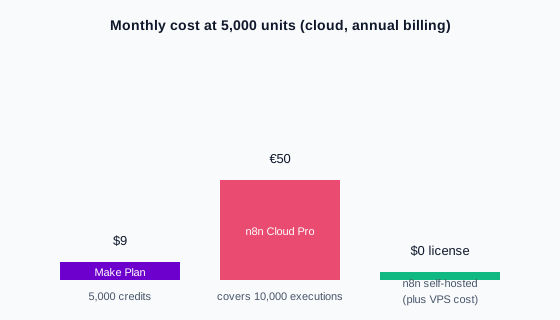
Two honest readings of that chart. First: if you want managed cloud at low-to-mid volume, Make undercuts n8n Cloud by a wide margin, and anyone telling you otherwise is selling something. Second: n8n’s cost story was never mainly about its cloud tiers. It is about the $0 AUD self-hosted license and the per-execution model that stops complex workflows from multiplying your bill.
Practitioner threads say the same thing in qualitative terms: n8n gets cheaper than Make at volume via self-hosting, while below a certain usage threshold Make can cost less all-in (ciela.ai roundup of Reddit agency threads).
Is Self-Hosting n8n Really Free?
No, and this is where we owe you the arithmetic most comparisons skip. You trade subscription fees for server management: provisioning a VPS (a rented virtual server that you manage yourself), applying updates and security patches, running backups, monitoring, and being the person on call when a workflow breaks at 2am.
A 2026 cost analysis priced out the full picture, including your time: a raw VPS looks like approx. $8-9 AUD ($5-6 USD) a month on paper, but reaches a realistic $85-510 AUD ($54-330 USD) a month once you price in one-time setup (approx. $75-300 AUD / $50-200 USD) and monthly maintenance time (approx. $75-155 AUD / $50-100 USD). Its conclusion: the raw VPS is “the ‘cheapest’ option on paper but the most expensive when you factor in your time” (instapods n8n pricing analysis).
A second 2026 analysis lands in the same place from different assumptions: approx. $8-31 AUD ($5-20 USD) a month of server plus roughly an hour a month of updates, backups, and troubleshooting comes to a realistic $85-110 AUD ($55-70 USD) a month once internal time is priced at $75 AUD ($50 USD) an hour, in its words “still cheaper than Zapier Team at $599/mo—but not ‘free’” (sinqra self-host cost analysis).
The same analysis found the sweet spot is managed self-hosting (roughly approx. $5-11 AUD ($3-7 USD) a month in infrastructure, with the maintenance burden removed) or n8n Cloud if you want zero server contact. Either way, the rule of thumb stands: self-hosting pays off only when the volume savings clearly exceed the maintenance effort.
And one asymmetry worth stating plainly: Make has no self-host option at all. If client data, health records, or compliance rules say data cannot leave your infrastructure, this section is not a cost comparison for you. It is a disqualifier for Make.
Which Is Better for AI and Complex Workflows?
n8n, at least today, for anything beyond simple AI steps. An “AI agent workflow” means automation where a language model decides what happens next, for example reading an inbound email, looking up the customer, and drafting a reply, rather than following fixed rules.
n8n ships native building blocks for this: an AI Agent node, vector store integrations, connectors for OpenAI, Google Gemini, and Anthropic, and RAG (retrieval-augmented generation, where the model looks up your own documents before answering) pipelines as a documented use case (n8n integrations). Self-hosted, it can also run against local models, so prompts and data never leave your network.
Make has invested visibly in 2026: Maia builds automations through natural-language conversation, and Make AI Agents act as autonomous decision-makers you can debug visually in the scenario builder (Make’s comparison page). For embedding a summarization or drafting step inside a visual scenario, these are capable. For multi-step agentic systems with retrieval and self-hosted models, n8n’s graph model and node ecosystem remain the more natural fit.
One practitioner caveat applies to both platforms: wherever a plain, deterministic automation step works, use it instead of an AI step. AI steps cost more, fail less predictably, and should earn their place in a workflow.
Can You Migrate from Make to n8n Later?
Yes, but manually. There is no automated import tool; every scenario is rebuilt by hand as an n8n workflow.
The good news is that the concepts map cleanly: scenarios become workflows, modules become nodes, operations become executions. Practitioner guidance puts a simple scenario’s rebuild at under an hour, and recommends running both platforms in parallel for 2-4 weeks before cutting over (cipherprojects comparison).
So the platform choice is not a one-way door, but it is a project. If you expect to outgrow Make’s cloud-only model within a year, starting on n8n avoids the rebuild.
What If You Would Rather Not Run It Yourself?
Everything above assumes you will build and maintain the workflows in-house. There is a third option: have a specialist build them for you.
That route usually wins when you have no technical staff, when workflows touch revenue or compliance, or when the cost of a broken automation exceeds the cost of hiring help. If that sounds like your situation, talk to us about our n8n workflow automation services and we will scope your first workflow with you.
Frequently Asked Questions
Is Make or n8n cheaper?
At low volume on managed cloud, Make is cheaper: approx. $14 AUD/mo ($9 USD) for 5,000 credits versus n8n Cloud’s approx. $33-83 AUD (€20-50 EUR) tiers. At high volume or self-hosted, n8n is cheaper: a $0 AUD license and no one billing you per execution, where Make’s credits keep scaling with every module step.
Is Make easier than n8n?
Yes, for non-technical users. Make’s visual canvas and onboarding are the smoothest in this category. n8n rewards comfort with JSON, APIs, and light scripting; teams with that comfort get more power per dollar.
Can you use Make and n8n together?
Yes. A common pattern: Make for quick, simple, low-volume scenarios, n8n for heavy, high-volume, or data-sensitive workflows. The two overlap less than their marketing suggests.
How do n8n and Make compare to Zapier?
Make is essentially the cheaper, more flexible cloud alternative to Zapier; n8n is the control-and-self-hosting alternative to both. We break down the third side of the triangle in our n8n vs Zapier comparison.
The Verdict: When Make Wins and When n8n Wins
n8n vs Make is not a repeat of n8n vs Zapier with different logos. Make is a strong, affordable cloud tool that wins on simplicity and entry-level price; n8n wins on control, complexity, self-hosting, and cost at scale. Volume, technical capacity, and data residency should decide it, not feature checklists.
If you would rather skip the build and get workflows designed, deployed, and maintained for you, see our n8n workflow automation services or get in touch.
 Related posts