Choosing between n8n and Zapier usually comes down to three things: how technical your team is, how much automation volume you run, and who is allowed to touch your data. This comparison uses official 2026 pricing from both vendors, plus what practitioners actually report in community threads, so you can make the call with real numbers instead of marketing pages.
Key Takeaways
- Zapier charges per task, n8n charges per workflow execution. A 10-step workflow processing 1,000 records costs 10,000 Zapier tasks but only 1,000 n8n executions.
- Below roughly 2,000 tasks a month, costs are similar. Past that, community threads describe Zapier’s task pricing climbing fast, while self-hosted n8n runs at server cost.
- Self-hosted n8n is not “free”: you pay in server maintenance, updates, and backups instead of subscription fees.
- For AI agent workflows, n8n is well ahead today, with native AI agent nodes, vector stores, and local model support.
- Many teams run both: Zapier for quick wins and niche connectors, n8n for heavy or data-sensitive workflows.
Quick Answer: Which One Should You Choose?
If your team is non-technical and you need automation working this week, choose Zapier. If you have technical capacity, run high volumes, or need data to stay on your own infrastructure, choose n8n.
| Your situation | Better fit |
|---|---|
| Non-technical team, simple two-step automations | Zapier |
| Need a niche SaaS connector fast | Zapier (9,000+ apps) |
| High volume (5,000+ workflow runs a month) | n8n |
| Complex logic: loops, branching, custom code | n8n |
| Data residency or compliance requirements | n8n (self-hosted) |
| Building AI agents or RAG pipelines | n8n |
The rest of this article explains the trade-offs behind that table, including the costs most comparison posts skip.
What Is the Actual Difference Between n8n and Zapier?
The two platforms make opposite architectural bets. Zapier is a fully managed, cloud-only service built around linear trigger-action workflows called Zaps. n8n is a source-available platform you can self-host or run as a cloud service, built around node-based graphs that support loops, branching, and custom JavaScript or Python.
“Self-hosting” means running the software on your own server instead of the vendor’s, so your data never leaves infrastructure you control.
On integrations, Zapier claims connections to more than 9,000 apps (Zapier pricing page). n8n lists 2,122 integrations on its official directory, plus the ability to call any API directly through its HTTP Request node (n8n integrations). Zapier wins on breadth; n8n’s direct API access closes most of the practical gap for technical teams.
The pricing model difference that changes everything
Zapier bills per task, where every action step inside a workflow counts as a task. n8n bills per execution, where one execution is a full run of the entire workflow no matter how many steps it contains (n8n pricing).
The arithmetic matters: a 10-step workflow processing 1,000 records consumes 10,000 Zapier tasks but only 1,000 n8n executions. Same work, tenfold difference on the meter.
How Does the Cost Compare at Real Volumes?
At low volume the two cost about the same. As volume grows, the pricing models pull the bills apart.
Here are the official entry points:
- Zapier Free: 100 tasks/month, two-step workflows only. Professional starts at approx. $31 AUD ($19.99 USD)/month billed annually for 750 tasks (Zapier pricing).
- n8n Community Edition: $0 AUD self-hosted with unlimited executions. n8n Cloud Starter is approx. $33 AUD (€20 EUR)/month billed annually for 2,500 executions, and Cloud Pro is approx. $83 AUD (€50 EUR)/month for 10,000 executions, all with unlimited users (n8n pricing).
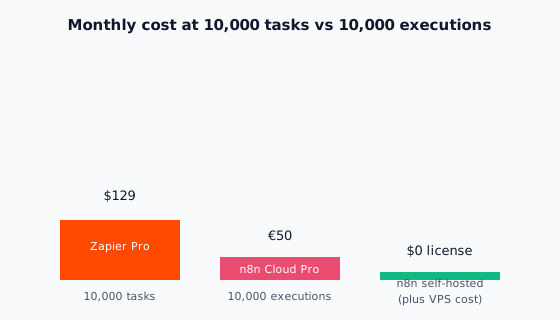
What practitioners report matches the official math in direction. In r/n8n and r/automation threads, a recurring theme is that Zapier’s task-based pricing climbs fast at high volume, and that self-hosted n8n’s savings outweigh the maintenance overhead once volume is high enough (ciela.ai roundup of Reddit threads). The official list prices put concrete numbers on that direction: 10,000 units a month costs $129 on Zapier Professional versus €50 on n8n Cloud Pro, as the chart above shows.
This cost pressure is exactly why n8n exists. In n8n’s 2019 Hacker News launch thread (728 points, 196 comments), founder Jan Oberhauser said commercial tools like Zapier “did not work for various reasons,” among them that “it gets expensive quite fast,” and named large companies, banks, and government that “care about their data” as a core audience for a self-hostable alternative (Hacker News thread).
Two hidden costs run in opposite directions. Zapier charges overage at 1.25x the base rate on annual plans once you exceed your tier (Zapier pricing). n8n’s hidden cost is not money but time, which brings us to the honest part of this comparison.
Is Self-Hosting n8n Really Free?
No. You trade subscription fees for server management: provisioning a VPS, applying updates and security patches, running backups, monitoring, and being the person who gets paged when a workflow breaks at 2am.
The honest rule of thumb: self-hosting pays off only when the volume savings clearly exceed the maintenance effort. For a team with no one comfortable managing a Linux server, “free” n8n can be the most expensive option on this page once you count the hours.
There is a middle path. n8n Cloud is fully managed, so you keep the per-execution pricing without touching a server. The cost gap versus Zapier narrows, but at 10,000 units a month you are still looking at €50 versus $129.
Self-hosting also has a non-cost justification: data residency. If client data, health records, or EU compliance rules say data cannot leave your infrastructure, self-hosted n8n is often the only realistic option of the two, because Zapier is cloud-only.
One licensing note that most comparisons skip: n8n is “fair-code,” distributed under its Sustainable Use License rather than a standard open-source license (n8n license text). For normal business use this changes nothing. It restricts reselling n8n itself as a competing hosted product.
Which Is Better for AI and Complex Workflows?
n8n, clearly, at least today. An “AI agent workflow” means automation where a language model decides what to do next, for example reading an inbound email, looking up the customer, and drafting a reply, rather than following fixed rules.
n8n ships native building blocks for this: an AI Agent node, vector store integrations, and connectors for OpenAI, Google Gemini, and Anthropic, with RAG pipelines as a documented use case (n8n integrations). Self-hosted, it can also run against local models, so prompts and data never leave your network.
Zapier has added AI features, including AI actions inside Zaps, chatbots, and agents billed separately in “activities” (Zapier pricing). These work well for simple tasks like summarizing or drafting text. For multi-step agentic systems, n8n’s graph model is the more natural fit.
This matters even if you only need simple automation right now. Comparison coverage in 2026 often frames the platform choice around AI capability (Hatchworks, Anglara), and the platform you pick today is the one your future AI workflows will grow on.
Can You Just Use Both?
Yes, and it is a pattern worth copying: use Zapier for quick wins and niche connectors, and n8n for heavy, high-volume, or data-sensitive workflows. Agency practitioners describe exactly this cost pressure, adopting self-hosted n8n for client work because per-task pricing climbs fast and eats into their margins (ciela.ai roundup of agency threads).
A simple heuristic: if the connector you need exists only in Zapier, use Zapier. If the workflow runs thousands of times a month or touches regulated data, put it on n8n.
What If You Would Rather Not Run It Yourself?
Everything above assumes you will build and maintain the workflows in-house. There is a third option: have a specialist build them for you.
That route usually wins when you have no technical staff, when workflows touch revenue or compliance, or when the cost of a broken automation exceeds the cost of hiring help. If that sounds like your situation, talk to us about our n8n workflow automation services and we will scope your first workflow with you.
Frequently Asked Questions
Is n8n better than Zapier?
Neither is universally better. Zapier wins on simplicity and connector breadth; n8n wins on cost at volume, complex logic, self-hosting, and AI workflows. Your team’s technical capacity, monthly volume, and data rules decide it.
Can I use n8n or Zapier for free?
Yes, both. Zapier’s free tier covers 100 tasks a month with two-step workflows. n8n’s Community Edition is free to self-host with unlimited executions, though you pay for the server it runs on.
Is n8n really open source?
Not in the strict sense. n8n uses a fair-code Sustainable Use License: the source is available and you can self-host it for normal business use, but you cannot resell it as a competing hosted product.
Can I migrate from Zapier to n8n later?
Yes, but workflows do not port automatically. Each Zap needs to be rebuilt as an n8n workflow, so plan migration as a project rather than an export.
How does Make fit into this comparison?
Make is the third platform buyers usually shortlist: cheaper and more flexible than Zapier in the cloud, but cloud-only like Zapier, with no self-host option. We break that side of the triangle down in our n8n vs Make comparison.
Conclusion
The n8n vs Zapier decision is not about features; it is about volume, technical capacity, and data residency. Zapier buys you speed and simplicity at a per-task price that scales painfully. n8n buys you control and cheap executions, and charges you in maintenance instead. For many businesses the honest answer is both, each doing what it is best at.
If you would rather skip the build and get workflows designed, deployed, and maintained for you, see our n8n workflow automation services or get in touch.
 Related posts