AI Agents vs Chatbots: What Does Your Business Actually Need?
The ai agents vs chatbots choice is a workflow choice. Use a chatbot for answers, intake, routing, and drafts. Use deterministic automation when the steps and system calls are known. Add a bounded AI agent only when the work needs context-based decisions or must handle exceptions across allowed tools.
An agent is not always better than a chatbot. Pick the least autonomous system that does the job well. Protect important actions with fixed checks and human approval.
Updated September 14, 2026.
Editorial ownership and method: The Praxon AI Editorial Team maintains this guide. It is practical advice for business decision-makers. Sources are linked in the text. This article has no market data and no client results.
Key Takeaways
- A chatbot answers, guides, collects details, or drafts.
- Deterministic workflow automation follows a known set of rules and calls.
- A bounded AI agent reads a goal, picks allowed steps, uses approved tools, and hands off when it is unsure.
- A chat window does not tell you what runs behind it.
- Keep the simpler system when it does the job.
AI agents vs chatbots: the quick business answer
A chatbot waits for a message. It sends back an answer, collects fields, routes a request, or writes a draft. It may search approved files or call one fixed lookup. That alone does not make it an agent.
An AI agent starts with a goal or an event. It reads the context and picks the next allowed step. It calls a tool and checks the result. Then it continues, stops, or hands the case to a person. The key test is who picks the next step. It is not how smart the reply sounds.
A fixed workflow may use a model to read an email or pull a field from a bill. It is still automation with AI help while the order of steps stays the same. Fixed paths are easier to test, control, and audit.
A chatbot can also sit in front of a deeper system. A customer types into the chat window while fixed rules check identity and access. A bounded agent may look into an exception behind the chat. The front end and the system behind it are two separate choices.
The AI Report calls the gap answers versus task completion. Mesh Flow says to test the next-step choice, the tool choice, the state, and the recovery. Do not trust the product label.
The NIST AI Risk Management Framework asks teams to define risk, measure behaviour, and manage the system over its full life. Ask what the system may do. Ask how you will watch it. Ask what happens when its context is thin.
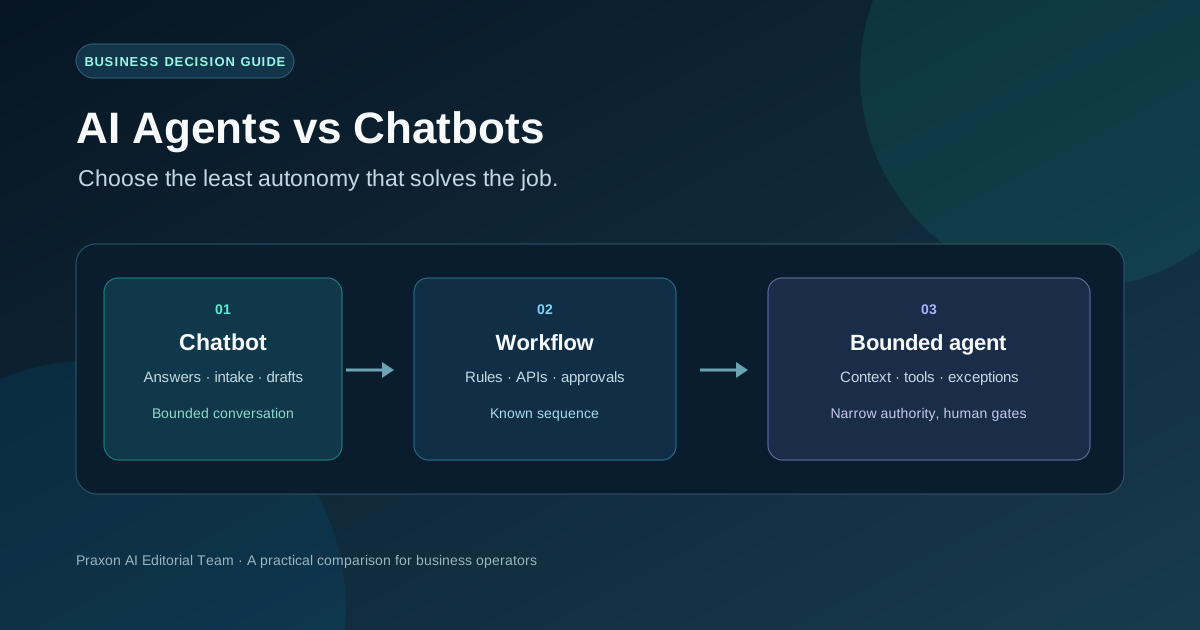
AI agent vs chatbot vs workflow automation: a practical comparison
These three types are a practical business split. They are not a strict rulebook. Real systems often mix them.
| Point | Chatbot or copilot | Fixed workflow automation | Bounded AI agent or hybrid |
|---|---|---|---|
| Main job | Answer, guide, or draft. | Run a known step order. | Reach a goal across allowed steps. |
| Path | Set flow or lookup. | Set branches and rules. | Picks the next allowed step. |
| Tool choice | None, or one fixed call. | Tools and order are set. | Picks from an allowed list. Rules still apply. |
| State | Chat or task memory. | Clear workflow state. | Task state plus context. The record stays the master. |
| Best fit | FAQs and intake. | Sync, math, schedules, checks. | Triage, research, and odd cases. |
| Action rights | Usually none, or one set action. | Actions are coded in. | Draft first. Act later, with checks. |
| Failure | Ask again or route to a person. | Known retry and fallback. | Stop, explain, keep a trace, hand off. |
| Main cost | Fresh content and good answers. | Steady connectors and rules. | Testing, access, traces, and human rework. |
| Proof of success | Right answer or good route. | Job done with no double or policy error. | Right result, good handoff, and safe failure. |
Use the least autonomous system that hits the goal. If an agent adds no real choice, it adds work and no gain. For a build or buy choice, see the build vs buy AI agents decision framework.
Should your business keep a chatbot, use automation, or add an agent?
Start with the job, not the label. Ask these five questions for one common workflow. Then pick the column that fits.
| Question | Keep the chatbot if | Keep fixed automation if | Try an agent or hybrid if |
|---|---|---|---|
| Is the output an answer or a draft? | Good content and a fallback are enough. | The output is a fixed record. | The reply needs facts or an allowed action. |
| Is the path known in advance? | A short chat or set route works. | You can list each step and check. | Odd cases change the path. |
| Do several systems take part? | One lookup or handoff is enough. | The same APIs run in the same order. | The system must pick the right read tool. |
| Can a wrong action be undone? | The user can fix the answer. | Retries and idempotency protect the job. | The agent drafts first. A person approves. |
| Can you measure success? | Answer quality and recontact. | Finished jobs and error rate. | Outcomes, handoff, rework, and cost per win. |
Do not upgrade yet if you lack a named owner, clean source data, an audit trail, a pause path, or a checkable output. A high-impact action that cannot be undone also needs approval. Microsoft Learn’s agent business value guidance puts value and measurement first.
When a chatbot is enough
A chatbot is a good fit when the work is answer-led, low risk, and based on current content. Fewer actions do not make it worse. They can make it easier to run.
A chatbot may be enough for:
- Answering product, policy, or internal questions with source links and a human fallback.
- Collecting intake fields before a person or fixed workflow takes over.
- Drafting a reply or sorting a ticket while a person decides.
- Guiding a user through a stable, low-risk flow with fixed, logged actions.
This only works with current, approved content, access-aware search, a clear handoff, and a way to track fixes and recontacts. If the bot is unsure, it should say so and pass the work on.
For a full list of candidate workflows, see AI agent use cases for business. The question here is narrower: does this job need run-time choices?
When deterministic automation is better than an AI agent
Use deterministic automation when the path is known and the rule matters more than judgment. Good fits include API sync, planned reports, exact math, alert thresholds, schema checks, set routing, and repeat approvals.
A model can still help inside that flow. But a model inside a fixed order does not make the system autonomous. One useful term for this risk is “agent washing”: a normal workflow is given an agent label with no real choices at run time. Treat it as a question to ask, not a charge to make. Ask who picks the next step. Ask what changes when an odd case shows up.
Keep logins, amount caps, schema checks, retries, and approvals in fixed code. AWS explains why idempotent APIs matter on a retry: the same request should not create a second side effect. For a normal or mixed workflow, n8n workflow automation services is one route.
How to upgrade from a chatbot or workflow to a bounded agent
Treat an upgrade as trust you earn with proof, not a switch you flip. The safest path goes from reviewable output, to read-only tools, to checked actions, and only then to narrow autonomy.
- Set the job and the baseline. Name the trigger, the goal, the owner, the systems, the odd cases, the current cycle time, the rework signal, and the tasks you will not automate. If rules and API calls solve the job, stop at fixed automation.
- Start with answers or drafts. Let the chatbot pull approved content, sort, sum up, or draft. Keep the output private or reviewable. Track fixes, handoffs, source coverage, and recontacts, not just speed.
- Add read-only tools. Allow set lookups for status, customer details, stock, or approved files. Log every source and tool call. Read access does not prove write access is safe.
- Add one hard choice. Let the model read intent, sort an odd case, pick one tool from a short list, or suggest the next step. Keep identity checks, schemas, policy caps, retries, and stop rules in fixed code.
- Add checked actions. A person approves outside messages, record changes, schedule exceptions, refunds, or finance exceptions. Keep the proposal, the proof, the approval, and the result.
- Allow narrow autonomy by type. Only a tested, undoable type with an owner, a pause path, and good handoff quality should run without a per-action check. High-impact types stay checked.
- Review and step back when needed. If the model adds no real choice, remove the agent step. Describe the system as it is.
The OWASP Excessive Agency guidance says to limit agent access and tools to what is needed. It also asks for human approval on high-impact actions. For build detail, use how to build an AI agent. For rollout planning, use the AI agent implementation plan.
What the upgrade costs you operationally
The main cost of an agent is not just model use. It is the work to test, control, watch, and recover a system that makes more choices.
| System | Work to plan for |
|---|---|
| Chatbot | Fresh content, answer checks, fallbacks, access, and search upkeep. |
| Deterministic workflow automation | Connectors, keys, retries, clear state, idempotency, and change control. |
| Bounded agent or hybrid | Test sets, tool access, context limits, traces, model drift, human rework, and pause or rollback drills. |
More autonomy widens the damage from a wrong call. Compare the cost of review and recovery, not just the model bill. NIST’s AI RMF treats monitoring and life-cycle risk as part of trust. Microsoft’s guidance ties an agent to a clear value and a way to measure it.
For build, run, and upkeep costs, read AI agent development cost. For baselines and payback, read AI agent ROI.
Four business scenarios that clarify the boundary
These short cases show how the best fit shifts as the work gets less routine.
Support questions. A chatbot can answer from approved files and route billing or security cases. Add a bounded agent only if it must read account data, pick among allowed lookup tools, and draft a case-specific reply. Refunds and account changes stay checked.
Lead intake. A set form and route suit fixed fields. An agent may read free-text intent, add to a record, and suggest an owner when odd cases are common. Duplicate checks and outbound mail stay fixed or approved.
Invoice exceptions. A set three-way match stays automation. An agent can explain mismatches across varied files and build an exception pack. Payment and ledger changes need finance approval.
Order or schedule exceptions. A chatbot can give status or take a request. A hybrid can read approved systems and suggest a fix. But stock, eligibility, cancellation, and customer promises need set rules and an owner.
For more candidate workflows, use AI agent use cases for business. These cases show where judgment may be worth a test. They do not promise a better result.
Frequently asked questions about AI agents and chatbots
Is an AI agent just a chatbot with tools?
No. Tools alone do not create agency. Ask if the system can pick among allowed tools or paths, hold state, read results, and stop or re-plan on its own. A fixed flow with one model step may just be automation with AI help.
Can a chatbot and an AI agent work together?
Yes. A chat window can take the goal. Fixed logic can route the request. An agent can handle one hard step or an odd case. Keep access, approvals, and undoable actions out of free model choice.
When should a small business upgrade from a chatbot to an agent?
Upgrade when a common workflow needs context-based choices across allowed systems. It should have a named owner, a baseline, and a result you can measure and undo. Do not upgrade just because the bot cannot answer a question whose source data is not ready.
Is an AI agent better than workflow automation?
Not in general. Fixed, exact, high-volume, or policy-bound work is often better served by plain automation. An agent can help when gray areas, changing context, or odd cases make a set path brittle. Many good systems use both.
What should stay behind human approval?
Payments, refunds, deletes, access changes, legal or medical advice, eligibility calls, security changes, high-impact customer messages, and low-confidence or policy-exception cases. Approval must be active, tied to a person, and logged.
How do I measure whether the upgrade worked?
Set the baseline first. Then track finished outcomes, good handoff, human rework, speed, failed tool calls, error rate, and cost per win. Use the AI agent ROI framework for the money side. Do not treat these as a promised return.
The bottom line: choose the least autonomy that solves the job
A chatbot fits bounded chat, knowledge, intake, and drafts. Fixed automation fits known paths, exact rules, and policy-bound steps. A bounded agent fits only when context-based choices and recoverable exceptions create enough value to justify the testing and the running cost.
Start small. Keep authority narrow. Make every step reversible. For scoped AI agent development delivery, review the services page. For normal or mixed orchestration, see n8n workflow automation services. When you have a workflow to assess, use the contact page to share the trigger, systems, odd cases, and approval lines.
The wider question of when a business needs an agent at all is covered in AI agent development for business.
 Related posts