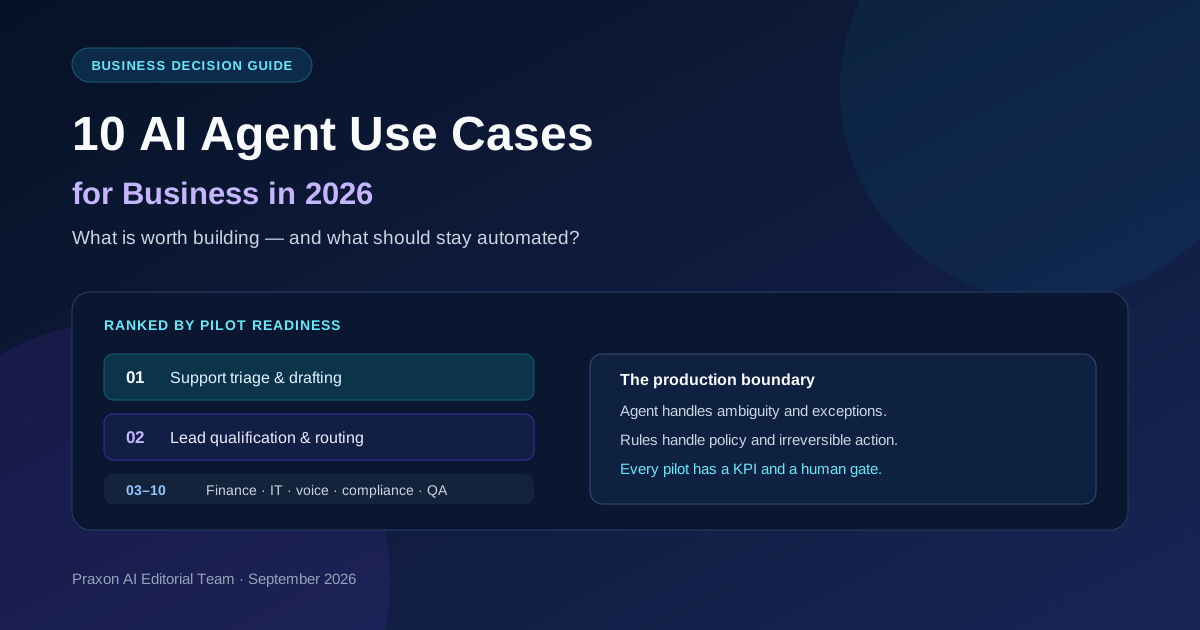
The best AI agent is not the most autonomous one. It is the workflow where context and exceptions create real value, actions stay bounded, and a person can undo a mistake.
This ranked catalog of AI agent use cases for business helps you choose a first pilot. Every card covers the problem, agent job, systems, allowed action, approval, KPI, failure mode, and when to skip it. The same test applies to any team: volume, ambiguity, data, recovery, measurement.
Architecture, lifecycle, financial formulas, cost models, and platform choice are out of scope. This page asks which workflow to pilot.
Updated September 14, 2026. Praxon AI Editorial Team analysis, not a market study or customer case study. No statistic or client result appears without a named source.
Key Takeaways
- An agent reads context, picks allowed tools, and finishes a bounded task with checks and escalation. A fixed sequence is automation.
- Good first pilots include support triage, lead routing, invoice exceptions, and document extraction. Their output is easy to check and their actions can stay supervised.
- Keep payments, refunds, deletions, legal or medical calls, and high-impact messages behind fixed checks and human approval.
- Score value, agent fit, data readiness, recovery, and measurement. Then apply a risk veto.
Pilot readiness at a glance
| Rank | Use case | Agent job | Risk | First KPI | Default mode |
|---|---|---|---|---|---|
| 1 | Support triage and drafting | Read, retrieve, draft | Medium | Correct triage | Supervised action |
| 2 | Lead qualification and routing | Read intent, suggest owner | Medium | Routing fixes | Draft and route |
| 3 | Invoice or PO exceptions | Explain mismatches | High | Straight-through rate | Supervised action |
| 4 | Document extraction | Extract, flag deviations | High | Field accuracy | Draft only |
| 5 | Internal research | Search, reconcile, cite | Low | Report cycle time | Draft only |
| 6 | IT incident triage | Investigate tools | Medium | Time to acknowledge | Read-only first |
| 7 | Voice intake and scheduling | Handle dialogue | Medium | Correct handoff | Supervised intake |
| 8 | Order exceptions | Pick a fix | Medium | Resolution time | Supervised resolution |
| 9 | Fraud and claims investigation | Link evidence | High | Analyst review time | Mandatory review |
| 10 | Software delivery and QA | Use tools, propose change | High | Review cycle time | Sandbox draft |
What makes a business workflow worth building as an AI agent?
An AI agent use case is a workflow where a system reads context, picks among allowed tools or paths, and finishes a bounded task a person can check or escalate. Four labels get mixed up, and the gap drives your budget:
- Fixed automation runs set rules and set steps. Nothing is open to reading.
- A copilot suggests or drafts. A person still decides.
- An agent reads a goal, picks among allowed tools or paths, and acts within limits.
- A multi-agent system splits work across several agents, adding coordination and tracking.
Use an agent where ambiguity, context, or shifting exceptions matter. Keep the happy path, policy checks, and hard-to-undo actions in plain code. n8n’s autonomous agent guidance agrees: start narrow, add deterministic guardrails, set stop conditions, and use human-in-the-loop approval to gate tool calls.
| Selection gate | Good signal | Veto signal |
|---|---|---|
| Business value | Frequent, costly, slow, or tied to revenue | Rare and mildly annoying |
| Agent fit | Cases need context or judgment | Every step is a stable rule |
| Data readiness | Trusted, current, permissioned sources | Conflicting files and tribal knowledge |
| Recovery | Draft, undo, or escalate | No way back |
| Measurement | A baseline and a named owner exist | Success means “it feels better” |
Apply a risk veto after scoring. Defer any candidate with no owner, audit trail, or override, even when the value looks high. That is sequencing, not rejection. Microsoft’s business-value guidance also puts value definition and telemetry ahead of scale.
Australian data boundary
Australian Privacy Principle 8 (APP 8) deals with one act: disclosing personal information to an overseas recipient. The Office of the Australian Information Commissioner (OAIC) sets out the reasonable steps and exceptions. This article is general technical information, not legal advice. Get a legal review for your workflow.
The 10 AI agent use cases for business, ranked by pilot readiness
1. Customer support triage and response drafting — start here for many teams
- Problem: Tickets differ by intent, urgency, history, and source.
- Why an agent: It reads, sets urgency, pulls knowledge, and drafts. Routing and policy checks stay fixed.
- Inputs and systems: Help desk, CRM, docs, order status, knowledge.
- Bounded action: Tag, assign, cite, save a draft. No refund, closure, or security call.
- Human gate: Billing, security, legal, escalation, low confidence, at-risk customers.
- KPI: Triage, draft acceptance, escalation, resolution time.
- Failure mode: Stale knowledge yields an answer outside the source set.
- When not to use: Fix the knowledge base or a low-volume queue first. Default autonomy: Supervised action. Test tagging before it runs alone.
2. Lead qualification, enrichment, and routing
- Problem: Teams read inbound messages, fill in records, and pick an owner.
- Why an agent: It reads intent, checks it against a set ideal customer profile, and suggests the next route.
- Inputs and systems: Forms, email, CRM, enrichment, calendar, history.
- Bounded action: Create or update a record, suggest a score and owner, draft a follow-up. Schemas and duplicate checks stay fixed.
- Human gate: High-value, unusual, or low-confidence leads, before contact.
- KPI: Response time, scoring precision, routing fixes.
- Failure mode: Overconfident scores, duplicate writes, or a bad outreach message.
- When not to use: Define the ICP and clean CRM data first.
Default autonomy: Draft and route with review. No outbound without a person.
3. Invoice and purchase-order exception review
- Problem: Finance compares varied invoices with purchase orders, receipts, and vendor records.
- Why an agent: It extracts fields, explains mismatches, and handles mixed formats. Rules enforce vendor and amount checks.
- Inputs and systems: Document store, extraction service, ERP, PO database, approval queue.
- Bounded action: Extract, match, flag, explain. Never pay or touch the ledger unapproved.
- Human gate: Exceptions, new vendors, thresholds, tax questions, missing sources.
- KPI: Straight-through rate, exception precision, duplicate-payment prevention.
- Failure mode: Wrong entity match, duplicate posting, or a missed line mismatch.
- When not to use: ERP-matched records need automation, not an agent.
Default autonomy: Supervised action, with fixed posting and idempotency checks.
4. Contract and document extraction with deviation routing
- Problem: Teams pull fields and spot deviations across repetitive contracts and forms.
- Why an agent: It reads varied wording, extracts fields, compares clauses, and routes odd cases.
- Inputs and systems: Repository, OCR/parser, metadata, clause library, review queue.
- Bounded action: Produce fields with clause evidence and mark deviations. No legal advice or term acceptance.
- Human gate: A named legal or ops owner reviews material deviations.
- KPI: Field accuracy, review time, missed gaps, escalation precision.
- Failure mode: Cross-clause links or untested formats produce errors that look right.
- When not to use: New terms need an expert, not raw extraction.
Default autonomy: Draft extraction and flags. A person makes the call.
5. Internal research, reporting, and knowledge retrieval
- Problem: Staff pull facts from approved sources and rebuild the same reports.
- Why an agent: It plans searches, picks tools, reconciles findings, and writes a cited draft.
- Inputs and systems: Role-scoped docs, CRM or analytics, approved web sources, templates.
- Bounded action: Retrieve, sum up, cite, draft. Keep facts apart from inference.
- Human gate: A person checks freshness, key conclusions, and sensitive details.
- KPI: Cycle time, citation coverage, correction rate, cost per report.
- Failure mode: Stale or conflicting sources produce a fluent but untraceable answer.
- When not to use: A fixed pull from one database should be a scheduled query.
Default autonomy: Draft only until source and test quality is proven.
6. IT incident triage and runbook assistance
- Problem: On-call teams link alerts, logs, runbooks, and ownership across tools.
- Why an agent: It searches several tools and adapts the next query to what it finds.
- Inputs and systems: Monitoring, logs, tickets, runbooks, service ownership, deployments.
- Bounded action: Sum up, pull a runbook, propose a fix, update a ticket. Start read-only.
- Human gate: An engineer approves any restart, rollback, config change, or production write.
- KPI: Time to acknowledge, resolution time, unsafe-action rate.
- Failure mode: Thin context, a stale runbook, or action on the wrong service.
- When not to use: No production write access in a first pilot.
Default autonomy: Read-only checks, with supervised fixes.
7. Customer or employee voice intake and scheduling
- Problem: Calls need intake, scheduling, screening, or status updates.
- Why an agent: It handles varied dialogue while filling a set schema and routing exceptions.
- Inputs and systems: Telephony, calendar, CRM, rules, ID checks, handoff.
- Bounded action: Ask approved questions, capture fields, book within rules, hand off.
- Human gate: Distress, disputes, regulated advice, unclear ID, complex requests.
- KPI: Correct handoff, completion, latency, drop-off.
- Failure mode: Early transfer, repetition, lag, or bad advice on a high-stakes call.
- When not to use: Not for regulated advice or eligibility calls.
Default autonomy: Supervised scheduling and intake only.
8. E-commerce order and inventory exception handling
- Problem: Order, stock, delivery, and customer records clash across systems.
- Why an agent: It reads the exception and picks among approved fixes.
- Inputs and systems: Storefront, ERP, inventory, shipping, CRM, returns policy.
- Bounded action: Explain, suggest a safe option, open a task, or route to fulfilment. Sync stays fixed.
- Human gate: Refunds, swaps, large orders, fraud signals, policy exceptions.
- KPI: Resolution time, stockout prevention, correct routing, refund fixes.
- Failure mode: Stale stock, a duplicate action, or an exception treated as normal.
- When not to use: Routine stock sync is an integration. See n8n AI agent workflow architecture.
Default autonomy: Supervised exception handling.
9. Fraud, compliance, and claims investigation
- Problem: Analysts gather evidence from changing records, and the final call carries risk.
- Why an agent: It investigates, links facts, sums up, and finds missing evidence.
- Inputs and systems: Case files, transactions, policy lib, ID records, audit sources.
- Bounded action: Rank cases and build an evidence file. Never deny, close, or make the ruling.
- Human gate: A qualified reviewer signs off. Keep the evidence, trace, and policy version.
- KPI: Review time, evidence, false positives, escalation quality.
- Failure mode: Bias, thin evidence, or a smooth write-up hiding a policy error.
- When not to use: If you cannot rebuild a decision, do not automate the final call.
Default autonomy: Analyst copilot with mandatory review.
10. Software delivery, QA, and security review
- Problem: Engineers break down work, review changes, test, and link security signals.
- Why an agent: It uses tools, adapts its search, and writes review notes.
- Inputs and systems: Issue tracker, repo, CI, tests, dependencies, runbooks.
- Bounded action: Draft a plan, propose a patch, run checks, open a review. Never merge or deploy alone.
- Human gate: Engineer, test, security, and deployment sign-off.
- KPI: Review time, escaped defects, coverage change, rollback rate.
- Failure mode: A patch looks fine but hides a regression or weak dependency.
- When not to use: Without tests and rollback, faster proposals add risk.
Default autonomy: Draft and test in a sandbox. A person merges and deploys.
Across all ten: let the agent handle ambiguity and exceptions, and let plain code handle the happy path, policy checks, and hard-to-undo actions.
How to choose the first pilot
Score each candidate from 1 to 5 on value, ambiguity, data, integration, recovery, measurement, and adoption. The score sorts a decision. It is not a financial model.
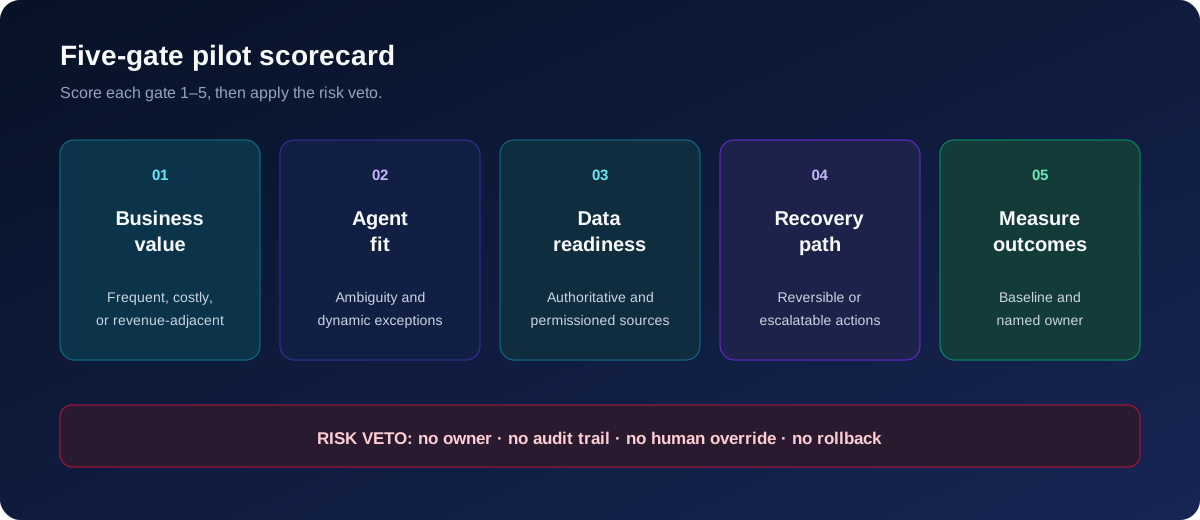
| Criterion | 5 looks like | 1 looks like |
|---|---|---|
| Value and frequency | Daily, costly, tied to revenue | Rare and mildly annoying |
| Ambiguity | Real judgment or exceptions | Stable rules |
| Data readiness | Current, trusted, permissioned | Conflicting sources |
| Integration | APIs and a test environment | Undocumented legacy systems |
| Recovery | Undo, or an audit trail | No rollback |
| Measurement | Baseline and named owner | No success definition |
| Adoption | One willing team | Conflicting stakeholders |
Apply the risk veto. Start with drafting or sorting, then read-only tools before writes. Keep the pilot to one team and one system of record. Capture good and bad runs. Widen autonomy once you know the error and handoff budget.
For architecture, see how to build an AI agent. For formulas and TCO, use measure AI agent ROI and AI agent development cost.
When not to use an AI agent
Use plain automation for fixed API sync, scheduled reports, exact math, threshold alerts, and strict validation. An LLM in a fixed path adds cost, lag, and failure risk.
Defer payments, refunds, deletions, eligibility calls, and legal, medical, or safety actions unless you have approval and rollback. Also defer open-ended work with no checkable output, low-volume work, poor source data, unclear owners, or no way back.
The rule: agents handle ambiguity and exceptions, plain code handles the happy path and hard-to-undo actions. This stops “agent washing”: calling a fixed integration an agent because a model sits inside it.
Frequently asked questions
What is the best AI agent use case for a small business?
Start with support triage, lead routing, document intake, or invoice exception review when the work is frequent, measurable, and reversible. For hosting and governance, see n8n for small business automation. For node recipes, see n8n use cases for small business.
What is the difference between an AI agent and ordinary workflow automation?
Automation follows a set path. An agent reads context or picks among allowed paths. Most live systems use both: fixed branches carry set steps, and the agent handles judgment and exceptions.
Which AI agent tasks still need human approval?
Payments, refunds, deletions, legal or medical calls, security changes, high-impact messages, and low-confidence or policy-exception cases. Approval needs an owner and a log.
How do I measure whether an AI agent use case works?
Capture a baseline, then track success, escalation, rework, latency, failed calls, and cost per good outcome. Measure handoff quality, not just transfer volume.
Can an AI agent use case be built without a large engineering team?
A bounded pilot can start on a platform or with a partner. Production still needs permissions, testing, monitoring, error handling, and an owner. Compare routes in build vs buy AI agents, or hire an n8n developer for scoped work.
Conclusion and next step
The right first use case has value, useful ambiguity, tight permissions, a way back, and a clear handoff. Pick one workflow. Write down its trigger, baseline, systems, approval line, and success metric before you build.
For help scoping the pilot, review Praxon AI’s workflow automation services or contact Praxon AI.
These candidates come from a broader selection method, set out in AI agent development for business.
 Related posts